


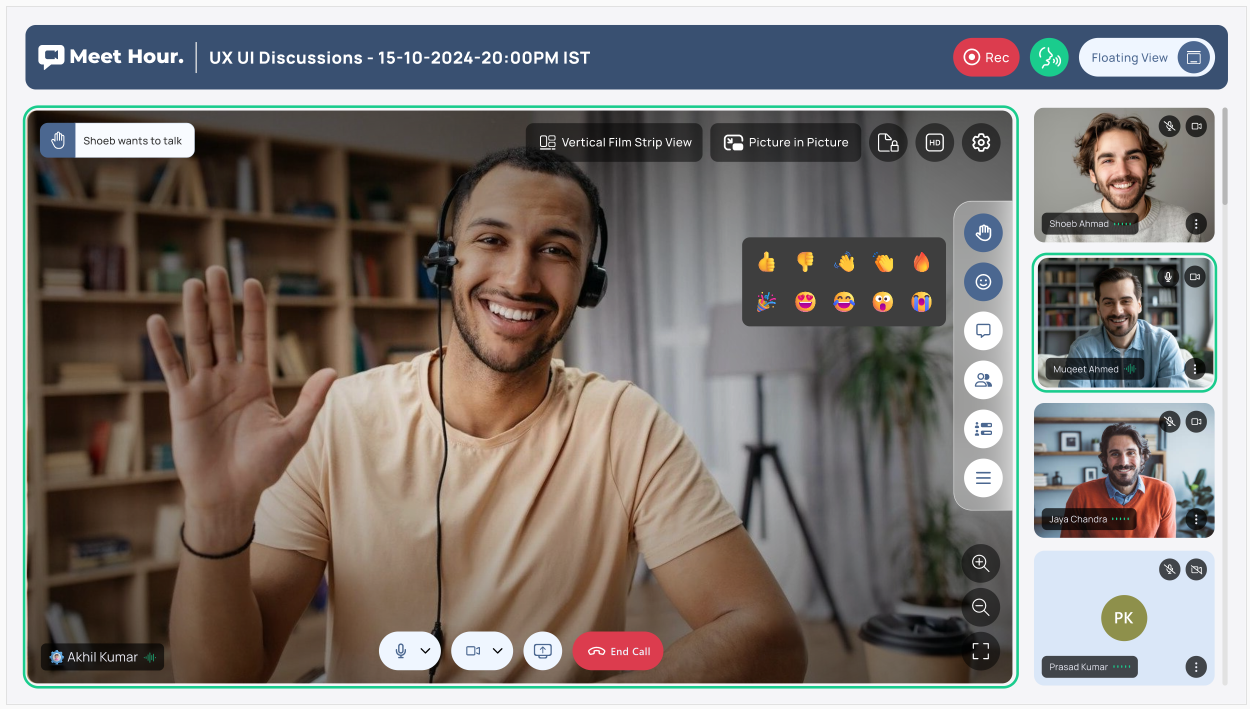
In a major step forward in its product journey, Meet Hour has rolled out a refreshed user interface that prioritizes usability, customization, and real-time engagement, all while retaining the platform’s robust backend functionalities. Officially launched on Sept. 15, the new design was over four months in the making and represents the result of hundreds of iterations and continuous user feedback to offer a more modern and responsive video conferencing experience.
Meet Hour in conversation
In an exclusive interview with The American Bazaar, the Meet Hour team discuss the revamped interface that introduces several layout options, branding features, and functional upgrades designed to enhance the user journey, from joining meetings to managing large-scale conferences and transcriptions.
In conversation were Founder and Chief Technology Officer Shoeb Fareed; Product Manager and Customer Engagement Lead Abdul Muqeet,; and Ul Senior Developer and Programmer Kareem Ahmed Ata.
Meet Hour’s new UI
At the core of the redesign is a dynamic tile-based layout system. Users can now switch between entire view, stage view, vertical view, and horizontal view depending on their preference. Each layout adapts seamlessly to highlight the dominant speaker while keeping the rest of the participants visible, creating a more intuitive visual hierarchy.
In stage view, the main speaker is centered, with others placed along the sides. Vertical and horizontal modes offer alternative configurations to suit different meeting dynamics. “You can pin participants, highlight speakers, and even view who’s dominating the conversation with subtle color cues: blue for active speakers and green for pinned participants,” explained Muqeet during the demo.
Fareed further added that participants’ tiles now show speaker icons, and interactions such as muting, pinning, and spotlighting are now smoother and more accessible.
READ: Meet Hour launches real-time transcription and translation features (
Beyond visuals, the new UI significantly strengthens in-call interactivity. Meet Hour now supports in-chat file sharing (PDFs, images, documents), poll creation with both single and multiple-choice formats, and private messaging during meetings. Users can launch polls mid-session and see the results update in real time.
Moderators have access to advanced controls, including force muting video and audio, as well as the ability to mute all participants simultaneously. A maximum of three breakout rooms can be created per session, offering a flexible way to host parallel discussions.
New emoji reactions and GIFs were also introduced, accompanied by sound cues to liven up the virtual environment. Reactions and shared content are stored in the chat transcript, which can now be preserved, downloaded, and revisited anytime from the dashboard.
One of the standout enhancements is the ability to preserve chat transcripts, even across recurring meetings. If chat preservation is enabled during scheduling, all exchanges are stored in the dashboard and displayed upon rejoining the same session. “There’s no time limit on the chat history,” confirmed Fareed. “You can return and download the entire conversation in a text file if needed.”
This also pairs well with the floating toolbar and floating view options, allowing users to work in full-screen mode without losing access to controls or chat.
Meet Hour’s new UI further allows for complete customization. For enterprise users, the platform now allows fully branded conference rooms and interfaces. Muqeet demonstrated how organizations can add their logos, custom URLs (e.g., meet.americanbazaar.com), and select personalized color schemes that reflect their brand identity.
READ: Apple considers slimmer and port-free designs for future (
Whether it’s a university, news agency, or startup, the entire visual experience can be tailored, right from the landing page to the meeting interface. Meet Hour has also begun offering branded desktop and mobile apps as an add-on for clients who want a seamless white-labeled experience.
“We’ve set up a custom branded conference for American Bazaar just to show how it works,” Muqeet said. “Everything, from logo visibility to the color palette, can be configured from the dashboard. Meet Hour’s name or branding won’t appear anywhere.”
The new interface retains one of Meet Hour’s most compelling features: live transcription and AI-powered translation. With support for over 38 transcription languages, the platform also allows simultaneous translation into languages like Arabic, Hindi, Urdu, French, and German.
Users can choose a preferred language for the app interface, making it easier for non-English speakers to navigate the platform. “Changing your conference language setting automatically syncs the entire dashboard into that language,” said Ahmed Ata.
Fareed emphasized that the transcription feature is powered by advanced AI and includes speaker identification, enabling a rich and accessible meeting record. However, he noted that translation in certain languages like Spanish may be limited due to higher server costs and latency issues.
READ: Lumenary launches Solar, a ‘vibe-coding’ platform to redefine app development (
With the new UI now live, Meet Hour’s next big milestone is an advanced webinar mode capable of handling up to 10,000 to 100,000 attendees. Fareed outlined the vision: a viewing-only mode where a select group of speakers (about five to six) can address large audiences while attendees observe without direct audio/video interaction.
This would drastically reduce server loads and operational costs, allowing Meet Hour to offer pricing advantages over incumbents like Zoom. “We’re trying to create a system where this can be scaled affordably,” Fareed noted.
The team is also exploring simulated live webinars, where recorded sessions are broadcasted as live, and interaction occurs only through moderated chat. Features like audience cloaking (where participants cannot see each other) and hidden breakout rooms are also in the pipeline to support digital marketers and online educators.
Central to Meet Hour’s development strategy is its user-driven roadmap, available publicly at roadmap.meethour.io. Users can submit feature requests, vote on ideas, and track progress in real time.
“We received a lot of feedback that users wanted a cleaner, more modern UI with better branding options,” said Muqeet. “So we designed over 300 unique pages, made countless mockups, and kept iterating even during live testing.”
The final result is a thoughtfully designed, feature-rich UI that balances simplicity with flexibility. With deeper customization, integrated polling, improved file sharing, enhanced chat history, and live AI translation, among many other features.